
Home screen and top menu
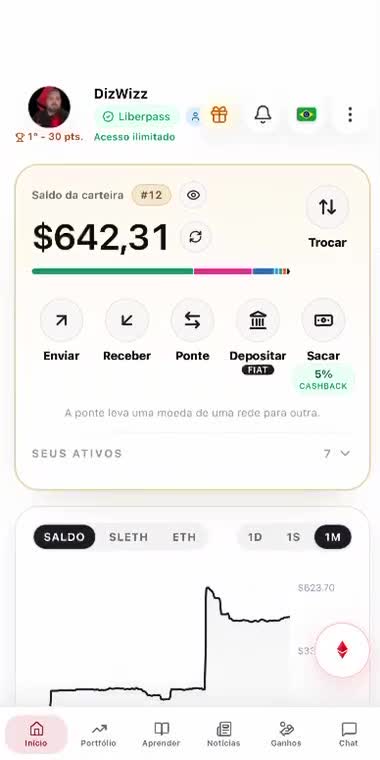
At the top are the photo, the score ranking, the name, the Liber Pass status, and the edit-profile icon. Beside them are the gift icon, chat or wallet notifications, the language switcher, and the menu.
Below that, a ticker shows the balance, the SL Ethereum price, and the Ethereum price. You can view 1 day, 1 week, or 1 month.
Recent activity lists what happened in the wallet. “See all” opens the blockchain link for each transaction.
The round red icon on the right opens Cesar, the LiberWallet AI (when LiberPass is active).
Top menu
- - Edit profile: changes the photo and the name.
- - Scan QR: connects LiberWallet to other apps.
- - Search: looks up an item by keyword.
- - Governance: opens the area about the SL Ethereum token’s role in LiberEther governance.
- - Advanced: gathers page creation, moderation, security devices, recovering funds through another wallet, passkeys, multisig, the signer list, and exporting the recovery key.
- - Add to home screen: places a LiberWallet shortcut on the phone’s home screen.
- - Add passkey: is done on the phone, with Face ID or Touch ID.
- - Sign out: ends the session.