Portfolio overview
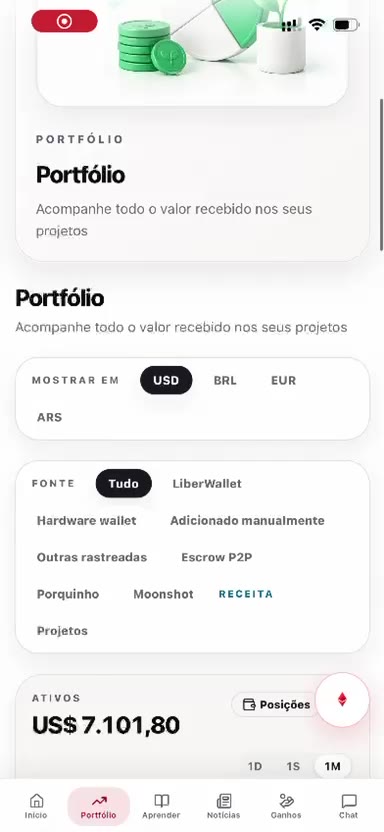
Portfolio is the second item in the bottom menu, from left to right. The screen title is “Track all the value received in your projects”.
Currency and sources
Under “Show in” the person chooses USD, BRL, EUR, or ARS.
Under “Source” the total can be filtered: All, LiberWallet, hardware wallet, added manually, other tracked wallets, P2P escrow, piggy bank, Moonshot, and projects. In the recording, Moonshot carries the label Revenue.
Assets, projects, and debt
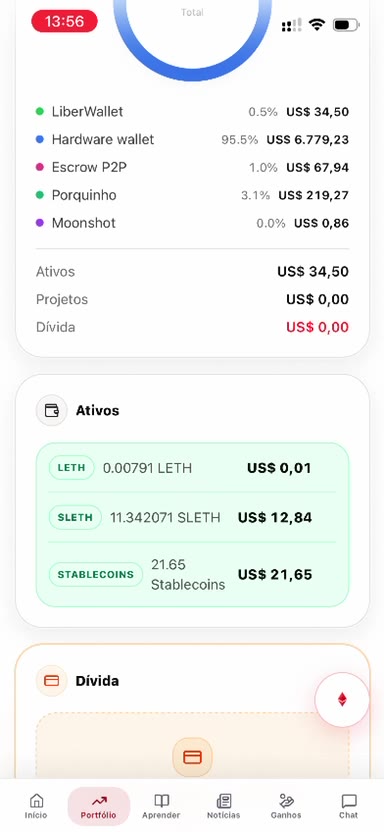
A chart splits the total by source. Below it, Assets lists the positions, Projects shows what came in by project, and Debt shows what was borrowed.
Wallets and cold vault
The hardware wallet appears with the networks and the buttons “Move to my Trezor” and “Send from my Trezor”. History lists the transfers, with the address and the transaction link.
The cold vault says the hardware-wallet balance is read-only and is not included in the portfolio total. That balance can be refreshed on the spot.
By project
“By project” shows the total received, the number of projects, paid reviews, and the average. The monthly timeline opens and closes.
The screen itself says on-chain balances appear only in the current month. Earlier months show manual entries, project revenue, and debts by date.